
Helping Hands
Using digital printing can help you take advantage of new business opportunities in the field.

This story was originally published in Big Picture Magazine in Nov-Dec 2024.
THE TRADITIONAL IDEA of ADA signage is raised white letters and Braille on a solid dark background that, in the past, served the necessary purpose. But in today’s world of branding and visual harmony in architecture and commercial design, clients are looking for more than basic signs — they want a consistent theme that requires more than simple plastic placards.
If you already have — or are considering acquiring — a UV-LED flatbed printer, you’re halfway to adding custom ADA signage that can provide a profitable revenue stream to your business. The production of ADA-compliant signage is very specific and if you want to add it to your offerings, become well-acquainted with the requirements that can be found on the US ADA website at www.ada.gov. Chapter 7, section 703 includes information on Braille dimensions and measurements.

For ADA signage, raised lettering can be produced using layered printing. PHOTOS: MIMAKI USA
There are many ways to digitally produce ADA signage. Originally the two processes used a photopolymer or a rotary engraving method (also known as “raster Braille”). Improvements have been made to technology to boost UV-LED printing for ADA applications. Continuing technology upgrades in UV-LED flatbed printing, including more accurate dot placement, advanced ink adhesion, software improvements, and more opaque white ink formulations, have made this digital print process ideal for producing specialized ADA signage. The ability to customize signage with branding or matched color schemes is a natural path for wide-format print service providers.
A recent capability of UV-LED printing is the ability to produce durable textured or 2.5D effects, which is an ink layering technique to add a tactile component to designs such as adding the look of lace to a wedding placard or brush strokes to artwork. Textured effects also enable the production of ADA and Braille signage with available design software and compatible processing software.
Using this printing technology rather than previous methods ensures your signage is fully customizable to your customer’s needs with full-color logos, gradients, and background in one print run. It reduces overhead by eliminating the need to stock multiple colors of the same material. No additional setup time is required between types of prints and materials, and no additional equipment or specialized labor is needed.
The combination of hardware advancements and software improvements results in a synthesis ideally suited to not only producing ADA signage, but also in the real-world environment that the final product serves. Tactile characters such as Braille are more durable using a UV-LED process, resulting in fewer replacements due to weather, wear, or continued cleaning.
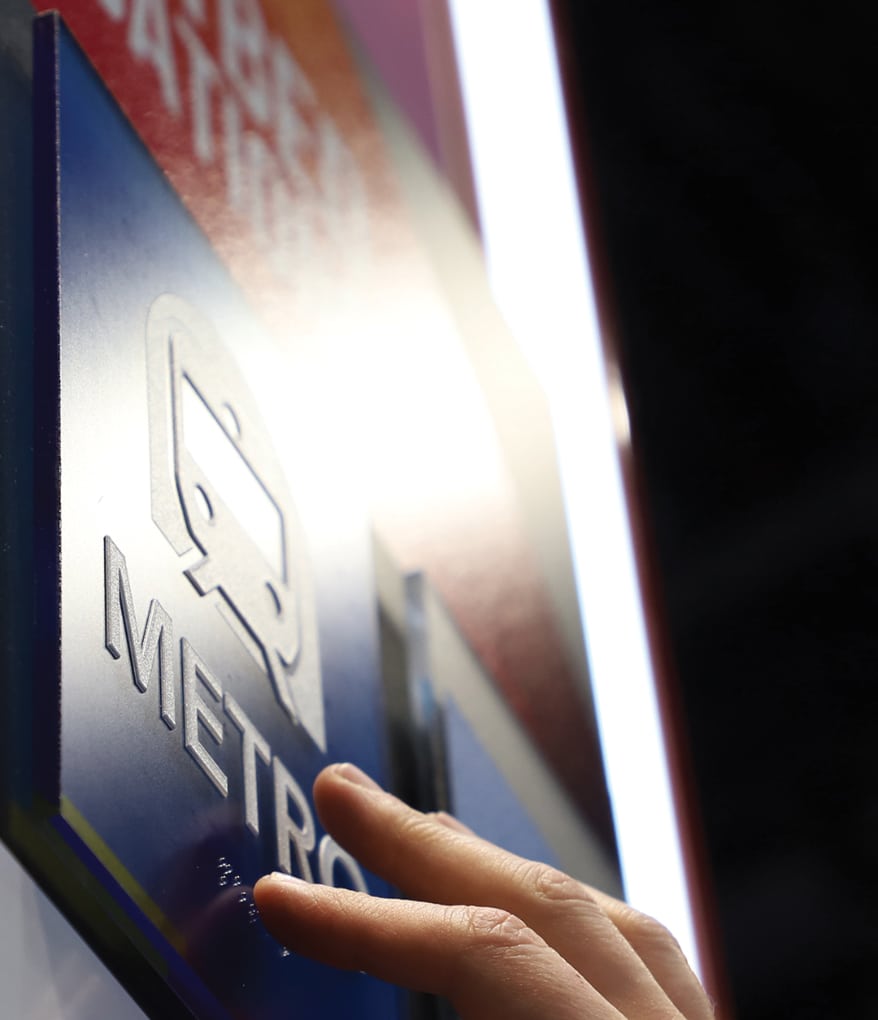
For ADA signage, raised lettering can be produced using layered printing.
What are the ADA Compliance Standards?
ADA compliance requires an ADA-certified inspection from the point of design through installation. Not all variables will be under your control if you want to print Braille signs. Your journey should start by consulting with leading printer manufacturers or their authorized representatives who offer hardware and inks that can withstand the rigors of ADA signage. They’re your ideal bet to acquire best practices for production, samples for media testing, and tools that help achieve your goals.
It’s also important to note that there are three types of ADA-compliant signage, and only one of them requires Braille. This category covers “Signs that designate permanent rooms and spaces: room numbers, restrooms, and exit signage,” that must physically be accessible. You can produce ADA-compliant signage without Braille if the items are not in this category. This includes overhead signage and wayfinding.
What you’ll need:
- hardware: First, of course, is a UV-LED flatbed printer. Many are available in the market, from tabletop to dual-bed sizes. While you may already have a 4 x 8-foot flatbed printer, smaller print beds such as 4 x 4-foot models tend to have tighter registration in a smaller footprint while maintaining the features of the larger bed printers.
Next are the inks and adhesion promoters, if necessary. This is where a good relationship with your printer manufacturer or seasoned authorized representative will immensely help you. Some inks are better for layering and offer greater durability, and some white inks are more opaque, so do your homework and know what you’ll need and if it fits your production environment. As always, it’s best only to use the printer manufacturer’s original or recommended inks to ensure production harmony and consistent output. - Software: In consultation with your printer manufacturer or authorized representative, review the options for processing (RIP) software. Be sure you have all the required plug-ins and profiles for your software and hardware. Depending on your hardware configuration and RIP software, you may be able to add special color layers to print primer and clear effects.
- Accessories: If you’re already mass-producing decorated objects, you’re familiar with using jigs. Create or acquire the necessary jigs to produce your ADA signage.
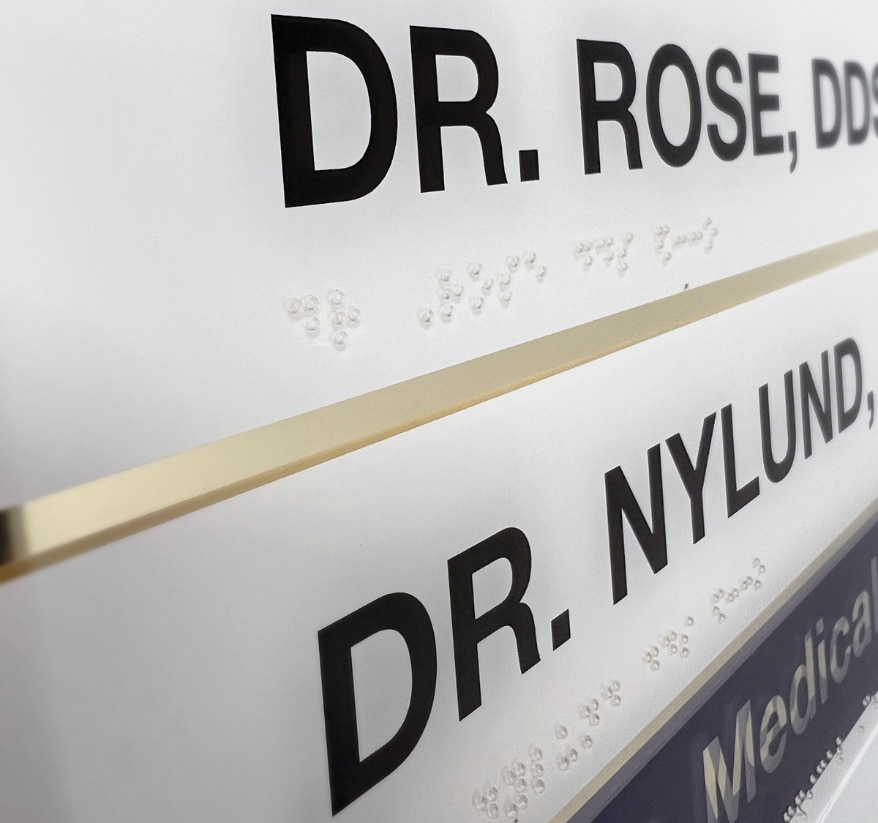
ADA signage doesn’t have to be monochromatic. With two-sided printing onto clear acrylic, you can produce colorful signs that get attention.
Design Notes
For creating Braille signs in Adobe ® Illustrator ®, lay out your design with all the components. Separate the text to be expressed in Braille. Convert the text to a Braille font available through third-party software on the US ADA website. To achieve ADA Standard Braille size, the font size should be 24pt. Note that a font is not required to print Braille — the dots can be created with 1.55mm circles and spaced according to ADA requirements. Follow the layout requirements set by ADA (2010) Standards as noted above.
Production Tips
Many ADA signs are a set size such as 6 x 9 inches, which easily can be produced in multiples at one time using jigs and fixtures to hold them in place. The larger the flatbed, the more signs that can be printed in one production run. Some UV-LED flatbed printers feature a high-speed, bi-directional printing mode for creating textured signage that can produce a 4 x 4-foot jig loaded with 35 6 x 9-inch signs in under two hours.
If you own a flatbed printer with dual origin points, you can use one side of the table to reverse-print corporate or color-matched designs onto acrylic and add raised text and Braille on the other side, ensuring continuous production for fast delivery.
Flatbed printing — and UV-LED printing producing textured and layered prints — is adding even more versatility to applications. Once you’ve mastered textured printing, you can use it to create many personalized items such as non-ADA required signage for museums and special event displays; independent living items such as tactile identification cards for clothing and keys; Braille learning toys and literacy tools; or identification placards to organize spaces such as craft boxes.
The ability to create ADA signage as a revenue stream is a natural path for wide-format print service providers. While it does require knowledge of and strict adherence to ADA Standards, once these elements are known and put into practice, the easier production becomes over time. The ability to produce in-demand ADA signage in a real-time workflow, and deliver with a quick turnaround, has increased the desire for specialized printing services that can benefit your company.
Advertisement









Living a Life of Trial and Error, Error, Error

The Hidden Danger of Running a ‘Successful’ Business

How to Handle Suspected Fake Reviews and More of Your Questions Answered



Bulletins
Get the most important news and business ideas from Big Picture magazine's news bulletin.
-

 How To1 month ago
Does the Wide-Format Printing Industry Have an End-of-Life Disposal Problem?
-

 TIp Sheet3 weeks ago
The Two-Hour Rule, the Pet Frog Close, and 7 More Ways for Print Pros to Work Smarter
-
 Business Growth: Mark Coudray4 days ago
The Hidden Danger of Running a ‘Successful’ Business
-

 TIp Sheet3 weeks ago
Stop the Pep Talks, Start the Stories: 5 More Tips for Wide-Format Print Pros
-

 Sales Strategies: Kevin Baumgart2 weeks ago
5 Simple Ways to Add Value (and Revenue) to Every Order
-
 Case Studies1 week ago
Wrap Challenges: How 4 Print Pros Tackled Their Toughest Projects
-

 Headlines2 months ago
Signelements.com Relaunches With Expanded Graphic Asset Library
-

 True Tales1 week ago
When Even the Artist Can’t Tell the Difference